Spring AI: RAG and an MCP Server in Spring Boot
By Uddip Acharjee Shuvo10 min read
A language model knows a lot about the world and nothing about your runbooks, architecture decisions or API docs. Two techniques close that gap. Retrieval-augmented generation (RAG) finds the relevant parts of your documents and hands them to the model with the question. The Model Context Protocol (MCP) lets AI assistants, such as coding agents in your IDE, call tools you provide, like a search over those same documents.
Spring AI makes both feel like ordinary Spring code: auto-configured clients, properties and annotations. This post builds a small document search service with RAG on PostgreSQL, then exposes it as an MCP server.
How RAG works
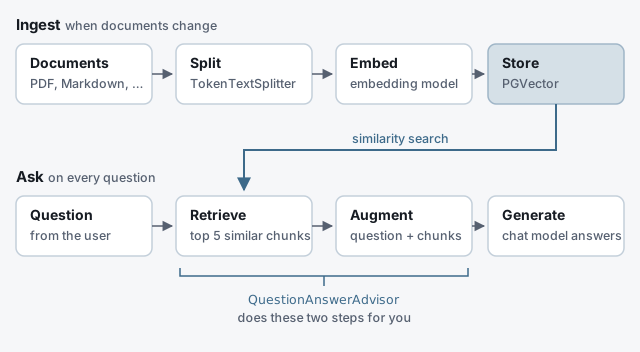
RAG has two halves. Ingestion runs whenever your documents change: split them into chunks, turn each chunk into a vector with an embedding model, and store the vectors. The question path runs on every request: embed the question, find the most similar chunks, put them in the prompt, and let the chat model answer from them.
Dependencies
dependencies {
    implementation platform("org.springframework.ai:spring-ai-bom:2.0.2")

    implementation 'org.springframework.ai:spring-ai-starter-model-openai'
    implementation 'org.springframework.ai:spring-ai-starter-vector-store-pgvector'
    implementation 'org.springframework.ai:spring-ai-vector-store-advisor'
    implementation 'org.springframework.ai:spring-ai-tika-document-reader'
    runtimeOnly 'org.postgresql:postgresql'
}
The OpenAI starter provides both the chat model and the embedding model. Swap in spring-ai-starter-model-ollama to run locally. Note spring-ai-vector-store-advisor: it provides QuestionAnswerAdvisor, and no starter pulls it in for you.
PostgreSQL as the vector store
PGVector adds a vector column type and similarity search to PostgreSQL, so your embeddings can live next to the rest of your data. The pgvector/pgvector image has the extension built in:
docker run -d --name pgvector -p 5432:5432 \
  -e POSTGRES_USER=postgres -e POSTGRES_PASSWORD=postgres \
pgvector/pgvectorspring.ai.openai.api-key=${OPENAI_API_KEY}
spring.datasource.url=jdbc:postgresql://localhost:5432/postgres
spring.datasource.username=postgres
spring.datasource.password=postgres
spring.ai.vectorstore.pgvector.initialize-schema=true
spring.ai.vectorstore.pgvector.index-type=HNSW
spring.ai.vectorstore.pgvector.distance-type=COSINE_DISTANCEinitialize-schema is off by default; with it on, Spring AI creates the vector_store table at startup. The vector dimensions come from the embedding model. If you later switch embedding models, the dimensions change too, so drop and re-create the table and ingest everything again.
Ingesting documents
A DocumentReader turns files into Documents, a splitter cuts them into chunks, and the vector store embeds and saves them in one call:
@Component
class DocumentIngestor {

    private final VectorStore vectorStore;

    DocumentIngestor(VectorStore vectorStore) {
        this.vectorStore = vectorStore;
    }

    void ingest(Resource resource) {
        List<Document> documents = new TikaDocumentReader(resource).read();

        TokenTextSplitter splitter = TokenTextSplitter.builder()
                .withChunkSize(800)          // tokens per chunk
                .withMinChunkSizeChars(350)
                .build();

        vectorStore.add(splitter.split(documents));
    }
}
Tika reads PDF, Word, HTML and many other formats; for plain text, TextReader is enough. Chunk size is a trade-off: small chunks match precisely but lose context, while large ones carry context but dilute the match. Around 800 tokens, the default, is a reasonable start. Re-ingesting a file adds new chunks next to the old ones, so delete a document’s previous chunks before loading a new version.
Answering questions
ChatClient is Spring AI’s fluent API for calling a model, and advisors wrap a call with extra behaviour. QuestionAnswerAdvisor is the RAG advisor: it searches the vector store with the user’s question and adds the matching chunks to the prompt.
@RestController
class AskController {

    private final ChatClient chatClient;
    private final QuestionAnswerAdvisor rag;

    AskController(ChatClient.Builder builder, VectorStore vectorStore) {
        this.chatClient = builder.build();
        this.rag = QuestionAnswerAdvisor.builder(vectorStore)
                .searchRequest(SearchRequest.builder()
                        .similarityThreshold(0.7)
                        .topK(5)
                        .build())
                .build();
    }

    @GetMapping("/ask")
    String ask(@RequestParam String question) {
        return chatClient.prompt()
                .user(question)
                .advisors(rag)
                .call()
                .content();
    }
}
topK caps how many chunks go into the prompt, and similarityThreshold drops chunks that are only loosely related, so the model is not distracted by noise. Both are worth tuning against a set of real questions. To narrow the search per request, pass a metadata filter:
chatClient.prompt()
        .user(question)
        .advisors(rag)
        .advisors(a -> a.param(QuestionAnswerAdvisor.FILTER_EXPRESSION, "team == 'payments'"))
        .call()
        .content();
For more control, such as rewriting the question before searching or deciding what happens when nothing relevant is found, the spring-ai-rag module offers RetrievalAugmentationAdvisor, built from separate retriever and augmenter components.
Exposing search as an MCP tool
RAG answers questions inside your application. MCP turns it around: an assistant your developers already use can call your search directly, and decide for itself when to.
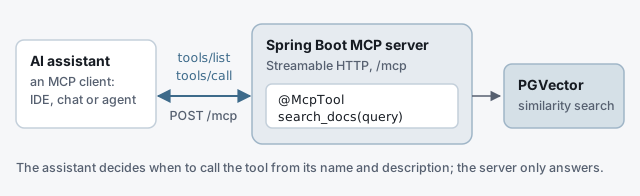
Add the MCP server starter for Spring MVC:
implementation 'org.springframework.ai:spring-ai-starter-mcp-server-webmvc'spring.ai.mcp.server.name=docs-search
spring.ai.mcp.server.version=1.0.0
spring.ai.mcp.server.protocol=STREAMABLE
spring.ai.mcp.server.instructions=Search the team's internal documentationStreamable HTTP is the default transport in Spring AI 2, and the endpoint is /mcp. Then write the tool as an annotated method on any bean:
@Component
class DocsTools {

    private final VectorStore vectorStore;

    DocsTools(VectorStore vectorStore) {
        this.vectorStore = vectorStore;
    }

    @McpTool(name = "search_docs",
             description = "Semantic search over the team's internal documentation. "
                     + "Returns the most relevant passages for a question or topic.")
    public List<String> searchDocs(
            @McpToolParam(description = "The question or topic to search for", required = true)
            String query) {
        return vectorStore.similaritySearch(SearchRequest.builder().query(query).topK(5).build())
                .stream()
                .map(Document::getText)
                .toList();
    }
}
@McpTool and @McpToolParam live in org.springframework.ai.mcp.annotation, and Spring AI finds them on startup. Write the descriptions for the model, not for a colleague: they are all it has to decide when the tool is useful and what to pass in. If you also want the method available to your own ChatClient, annotate it with Spring AI’s @Tool instead and register it with a MethodToolCallbackProvider bean, which the MCP server exposes as well.
To try it, point any MCP client that supports Streamable HTTP at http://localhost:8080/mcp. The MCP Inspector (npx @modelcontextprotocol/inspector) lists the tools and lets you call them by hand.
Coming from Spring AI 1.x
- Spring AI 2 requires Spring Boot 4. Spring AI 1.x stays on Boot 3.
- The advisor artifact was renamed from
spring-ai-advisors-vector-storetospring-ai-vector-store-advisor; the package is the same. - Model property keys lost their
.optionssegment:spring.ai.openai.chat.options.modelis nowspring.ai.openai.chat.model. - The MCP annotations moved from
org.springaicommunity.mcpintoorg.springframework.ai.mcp.annotation, and the MCP server now defaults to Streamable HTTP; SSE is deprecated. - Builders replace constructors:
new TokenTextSplitter()is deprecated, andQuestionAnswerAdvisoris created only through its builder. - Pre-1.0 starter names such as
spring-ai-openai-spring-boot-starterare long gone; starters are now namedspring-ai-starter-model-*andspring-ai-starter-vector-store-*.
Checklist
- BOM, model starter, PGVector starter, and the vector-store advisor artifact.
initialize-schema=truefor the first run, and a re-ingest whenever the embedding model changes.- Chunks around 800 tokens to start, old chunks deleted on re-ingest.
QuestionAnswerAdvisorwithtopKand a similarity threshold tuned on real questions.- An MCP tool with descriptions written for the model.
- Authentication in front of
/mcpbefore it is shared.