Transactional Outbox with Spring Modulith Events
By Uddip Acharjee Shuvo9 min read
When an order is placed, other parts of the system need to react: reserve stock, send a confirmation, publish a message to Kafka. Doing that reliably is harder than it looks. React inside the order’s transaction, and a failure in the stock code cancels the order. React after the commit, and a crash at the wrong moment loses the reaction for good.
The transactional outbox pattern solves this. The event is stored in the same database transaction as the order, then delivered afterwards and retried until it succeeds. Spring Modulith’s event publication registry implements that pattern for ordinary Spring application events. This post continues the shop example from Spring Modulith: Build a Modular Monolith in Spring Boot, on Spring Boot 3.4 and Spring Modulith 1.3.
Why a plain event listener is not enough
The orders module publishes an OrderCreatedEvent after saving, and inventory listens for it:
@EventListener
void on(OrderCreatedEvent event) {
    inventory.reserve(event.productCode(), event.quantity());
}
@EventListener runs synchronously on the publishing thread, inside the order’s transaction. If reserve throws, the order rolls back. If it is slow, placing an order is slow. The modules are separate in the code but still tied together at runtime.
@TransactionalEventListener moves the listener to after the commit. That fixes the coupling, but the event now exists only in memory. If the listener fails, or the application stops between the commit and the listener running, the stock is never reserved and nothing records that it should have been. This is the classic dual write problem: two things that must both happen, and no transaction covering both.
How the event publication registry works
With the registry on the classpath, publishing an event inside a transaction also writes one row per transactional listener into an event_publication table. Because that write happens in the business transaction, the order and its pending events commit together, or not at all.
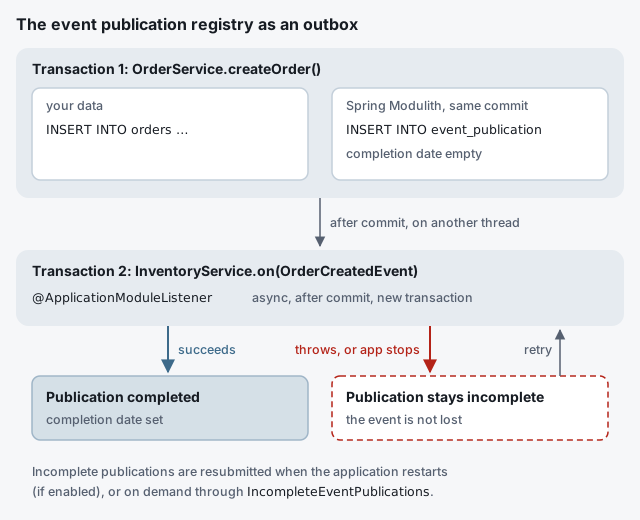
After the commit, each listener runs. When it returns normally, its publication is marked complete. When it throws, the publication stays incomplete, and the event is still in the database, serialized as JSON, ready to be delivered again.
Setting it up
Pick one registry starter. The JDBC variant works in JPA applications too and can create its own table:
implementation 'org.springframework.modulith:spring-modulith-starter-jdbc'# create the event_publication table on startup (off by default before Modulith 2.1)
spring.modulith.events.jdbc.schema-initialization.enabled=true
# optional: keep it in its own schema
spring.modulith.events.jdbc.schema=eventsspring-modulith-starter-jpa is the alternative. It stores publications through a JPA entity, so create the table with your migrations (Flyway or Liquibase) like any other.
Listening with @ApplicationModuleListener
@Service
class InventoryService {

    @ApplicationModuleListener
    void on(OrderCreatedEvent event) {
        inventory.reserve(event.productCode(), event.quantity());
    }
}
@ApplicationModuleListener is shorthand for three annotations:
@TransactionalEventListener: runs after the order’s transaction commits, never for a rolled-back order.@Async: runs on another thread, so placing the order does not wait for inventory.@Transactional(propagation = REQUIRES_NEW): the listener gets a transaction of its own.
It relies on Spring’s @Async support, so add @EnableAsync to a configuration class if nothing in your application enables it yet. The registry covers any @TransactionalEventListener, but this one annotation captures the combination you almost always want between modules.
Retrying incomplete publications
Incomplete publications stay in the table until something resubmits them. There are two ways to do that.
On restart
spring.modulith.events.republish-outstanding-events-on-restart=trueThis is simple and fits a single instance. With several instances, each one republishes everything on startup, which the Spring Modulith documentation advises against.
On a schedule
IncompleteEventPublications resubmits on demand. Only retry publications older than a few minutes, so you don’t resubmit events whose listeners are still running:
@Component
class RetryIncompletePublications {

    private final IncompleteEventPublications incomplete;

    RetryIncompletePublications(IncompleteEventPublications incomplete) {
        this.incomplete = incomplete;
    }

    @Scheduled(fixedDelay = 60_000)   // needs @EnableScheduling
    void retry() {
        incomplete.resubmitIncompletePublicationsOlderThan(Duration.ofMinutes(5));
    }
}
With several instances, make sure only one runs the job at a time, for example with ShedLock.
Cleaning up completed publications
By default a completed publication stays in the table with its completion date set, which is handy for auditing and grows forever. Since Spring Modulith 1.3 you can choose what happens on completion:
# update (default): keep the row, set the completion date
# delete: remove the row as soon as the listener succeeds
# archive: move the row to event_publication_archive
spring.modulith.events.completion-mode=delete
If you keep the default, purge old rows on a schedule with CompletedEventPublications.deletePublicationsOlderThan(…).
Testing a listener
Spring Modulith’s Scenario can publish an event and wait for the asynchronous listener to finish its work:
@ApplicationModuleTest
class InventoryModuleTests {

    @Autowired
    InventoryService inventory;

    @Test
    void reservesStockWhenAnOrderIsCreated(Scenario scenario) {
        scenario.publish(new OrderCreatedEvent("ORD-1", "P100", 2))
                .andWaitForStateChange(() -> inventory.reservedQuantity("P100"), qty -> qty == 2)
                .andVerify(qty -> assertThat(qty).isEqualTo(2));
    }
}
Sending events to Kafka through the same outbox
When other services need the event too, mark it for externalization and add the Kafka module (spring-modulith-events-kafka; there are AMQP, JMS and Spring Messaging variants as well):
@Externalized("orders.created::#{#this.orderNumber()}")
public record OrderCreatedEvent(String orderNumber, String productCode, int quantity) {}
The part before :: is the Kafka topic. The expression after it becomes the message key, so all events for one order land in the same partition, in order. Externalization is itself a transactional event listener, so it goes through the registry like any other: if Kafka is down, the publication stays incomplete and is retried, which is exactly what a transactional outbox to a broker should do.
On Spring Modulith 2
Spring Modulith 2.x, for Spring Boot 4, extends the registry. Each publication now has an explicit status (published, processing, completed, failed, resubmitted). A staleness monitor flags publications stuck in processing, and FailedEventPublications resubmits failures with options. From 2.1, JDBC schema initialization is on by default. The concepts and annotations in this post stay the same.
Checklist
- One registry starter (
-jdbcor-jpa), and the table created by Modulith or by your migrations. @ApplicationModuleListenerbetween modules, with async execution enabled.- Idempotent listeners: delivery is at least once.
- A retry strategy: republish on restart for one instance, or a scheduled
IncompleteEventPublicationsjob. - A completion mode or a purge job, so the table doesn’t grow forever.
@Externalizedfor events other services need, so the broker gets the same guarantees.