Process a Million-Row File with Spring Batch
By Uddip Acharjee Shuvo10 min read
Loading a flat file into a database looks like a ten-line job until the file has a million rows. Read it into a List first and the JVM runs out of heap. Wrap the whole load in one transaction and a bad row near the end throws away everything before it. Spring Batch’s chunk-oriented steps solve both problems: memory stays flat no matter how big the file is, and a failed run picks up where it stopped.
This guide builds a job that imports a fixed-width or CSV file into PostgreSQL, using Spring Boot 3 and Spring Batch 5. It is based on my spring-batch-demo repository, which includes a 51 MB test file of one million fixed-width lines.
How a chunk-oriented step works
A step reads items one at a time until it has a full chunk, runs each item through an optional processor, then hands the whole chunk to the writer. Reading, processing and writing one chunk happen inside a single transaction. If the writer succeeds, the transaction commits and the step starts on the next chunk. If it fails, only that chunk rolls back.
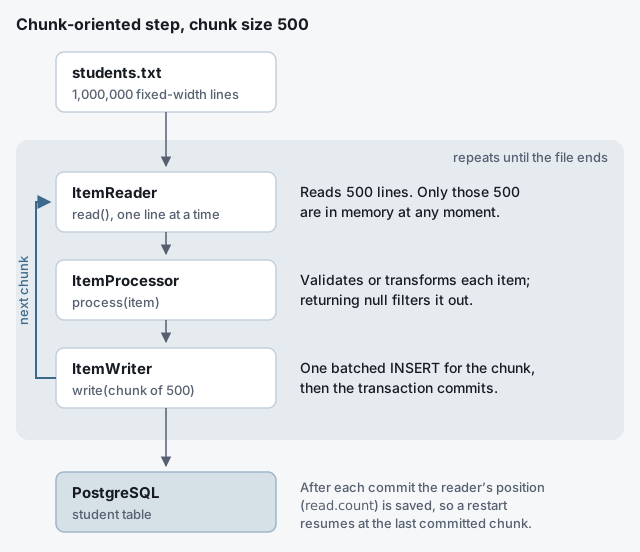
Two consequences matter for large files. Memory use is bounded by the chunk size, not the file size. And because Spring Batch records progress after every commit, a job that dies at row 600,000 can restart at row 600,001 instead of at row 1.
Reading a fixed-width file
In a fixed-width file every field occupies the same columns on every line, padded with spaces. Banks and older systems still export data this way. A few lines look like this:
0000001Ayesha              Rahman              29
0000002Tanvir              Hossain             31
0000003Nusrat              Jahan               27
FlatFileItemReaderBuilder turns each line into a Student, a plain class with uid, firstName, lastName and age properties. Each Range is 1-based and inclusive, so new Range(1, 7) means the first seven characters:
@Bean
@StepScope
public FlatFileItemReader<Student> studentReader(
        @Value("#{jobParameters['input.file']}") String inputFile) {
    return new FlatFileItemReaderBuilder<Student>()
            .name("studentReader")
            .resource(new FileSystemResource(inputFile))
            .fixedLength()
            .columns(new Range(1, 7),     // uid
                     new Range(8, 27),    // firstName
                     new Range(28, 47),   // lastName
                     new Range(48, 50))   // age
            .strict(false)                // allow short last field
            .names("uid", "firstName", "lastName", "age")
            .targetType(Student.class)
            .build();
}
A few details that are easy to get wrong:
- Order matters in the builder.
strict(false)has to come beforenames(…).namesreturns you to the outer builder, whose ownstrictmethod controls something else: whether a missing input file is an error. - Strict lines. By default the tokenizer rejects any line shorter than the last range. Files with trimmed trailing spaces need
strict(false)on the fixed-length builder. @StepScopeand a job parameter for the path. The reader is created when the step starts, so each run can point at a different file, and the file path becomes part of the job’s identity. That is what makes restarts work, as shown below.targetTypemaps fields onto a JavaBean by property name. A Java record works too: Spring Batch detects records and calls the canonical constructor.
Reading a CSV file
CSV is the same reader with a delimited tokenizer. Skip the header line, and the default delimiter (a comma) and quote character (") cover most files:
return new FlatFileItemReaderBuilder<Student>()
        .name("studentCsvReader")
        .resource(new FileSystemResource(inputFile))
        .linesToSkip(1)                       // header row
        .delimited()
        .names("uid", "firstName", "lastName", "age")
        .targetType(Student.class)
        .build();
Writing: batched JDBC beats saving entities one by one
The writer is where most of the time goes. A RepositoryItemWriter calls your Spring Data repository’s saveAll, which hands each entity to JPA. Hibernate only groups those INSERTs into JDBC batches if you configure it to, and never for entities with IDENTITY ids. For a straight load, JdbcBatchItemWriter skips the persistence context and sends the whole chunk as one JDBC batch:
@Bean
public JdbcBatchItemWriter<Student> studentWriter(DataSource dataSource) {
    return new JdbcBatchItemWriterBuilder<Student>()
            .dataSource(dataSource)
            .sql("""
                 INSERT INTO student (uid, first_name, last_name, age)
                 VALUES (:uid, :firstName, :lastName, :age)
                 ON CONFLICT (uid) DO NOTHING
                 """)
            .beanMapped()        // :uid -> student.getUid(), ...
            .assertUpdates(false) // ON CONFLICT may update 0 rows
            .build();
}
ON CONFLICT (uid) DO NOTHING makes the insert idempotent, which is a cheap safety net when a file is loaded twice. It relies on a unique constraint on uid, and it needs assertUpdates(false): by default the writer fails if any statement in the batch affected zero rows. beanMapped() reads values through getters. For a record, pass an itemSqlParameterSourceProvider instead.
On PostgreSQL, add one more setting to the JDBC URL. With reWriteBatchedInserts=true, the driver rewrites a batch of single-row INSERTs into multi-row INSERT statements, which means far fewer round trips:
spring.datasource.url=jdbc:postgresql://localhost:5432/batch?reWriteBatchedInserts=trueIf you need JPA in the writer (entity listeners, cascades), turn on Hibernate’s batching and give the entity a sequence-based id:
spring.jpa.properties.hibernate.jdbc.batch_size=500
spring.jpa.properties.hibernate.order_inserts=true
Wiring the step and the job
The processor is optional. Here it filters out rows that fail a basic check: returning null from process drops the item, and the step counts it as filtered rather than failed.
@Component
class StudentValidator implements ItemProcessor<Student, Student> {

    @Override
    public Student process(Student student) {
        return student.getAge() > 0 ? student : null; // null = filter out
    }
}
The step ties the reader, processor and writer together with a chunk size and a transaction manager, and the job runs that one step:
@Bean
public Step importStudentsStep(JobRepository jobRepository,
                               PlatformTransactionManager transactionManager,
                               FlatFileItemReader<Student> studentReader,
                               StudentValidator studentValidator,
                               JdbcBatchItemWriter<Student> studentWriter,
                               ThroughputListener throughputListener) {
    return new StepBuilder("importStudentsStep", jobRepository)
            .<Student, Student>chunk(500, transactionManager)
            .reader(studentReader)
            .processor(studentValidator)
            .writer(studentWriter)
            .listener(throughputListener)
            .build();
}

@Bean
public Job importStudents(JobRepository jobRepository, Step importStudentsStep) {
    return new JobBuilder("importStudents", jobRepository)
            .start(importStudentsStep)
            .build();
}
Choosing a chunk size
The chunk size is the commit interval. Small chunks spend their time on commits. Large chunks hold more items in memory, keep transactions open longer, and lose more work when one fails. Somewhere between 100 and 1,000 is a good starting range for simple rows. Then measure instead of guessing. A step listener can log what each run did:
@Component
public class ThroughputListener implements StepExecutionListener {

    private static final Logger log = LoggerFactory.getLogger(ThroughputListener.class);

    @Override
    public ExitStatus afterStep(StepExecution step) {
        Duration took = Duration.between(step.getStartTime(), LocalDateTime.now());
        log.info("{}: read={} written={} skipped={} commits={} in {}s",
                step.getStepName(), step.getReadCount(), step.getWriteCount(),
                step.getSkipCount(), step.getCommitCount(), took.toSeconds());
        return step.getExitStatus();
    }
}
Run the same file with chunk sizes of 100, 500 and 1,000 and compare. The same numbers are stored in the BATCH_STEP_EXECUTION table, so you can also compare runs with a query.
Starting the job from a REST endpoint without blocking
By default, Spring Boot launches your job when the application starts. For a job triggered on demand, switch that off. On PostgreSQL, also ask Boot to create Spring Batch’s metadata tables, which it only does automatically for embedded databases:
spring.batch.job.enabled=false
spring.batch.jdbc.initialize-schema=always
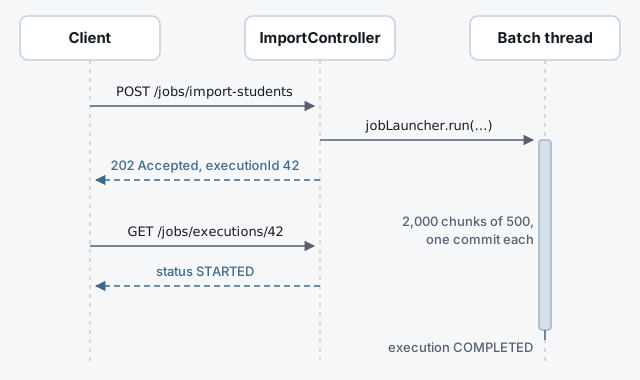
The default JobLauncher runs the job on the calling thread, so an HTTP request would hang until the last chunk is written. A TaskExecutorJobLauncher with its own executor hands the job to a background thread and returns the JobExecution straight away:
@Bean("asyncJobLauncher")
public JobLauncher asyncJobLauncher(JobRepository jobRepository) throws Exception {
    ThreadPoolTaskExecutor executor = new ThreadPoolTaskExecutor();
    executor.setCorePoolSize(2);      // at most two imports at a time
    executor.setMaxPoolSize(2);
    executor.setQueueCapacity(10);
    executor.setThreadNamePrefix("batch-");
    executor.initialize();

    TaskExecutorJobLauncher launcher = new TaskExecutorJobLauncher();
    launcher.setJobRepository(jobRepository);
    launcher.setTaskExecutor(executor);
    launcher.afterPropertiesSet();
    return launcher;
}
A small, fixed pool is deliberate: it caps how many imports can run at once, so a burst of requests queues up instead of opening dozens of database connections. The controller starts the job and answers 202 Accepted with the execution id, and a second endpoint reports progress:
@RestController
@RequestMapping("/jobs")
class ImportController {

    private final JobLauncher jobLauncher;
    private final Job importStudents;
    private final JobExplorer jobExplorer;

    ImportController(@Qualifier("asyncJobLauncher") JobLauncher jobLauncher,
                     Job importStudents, JobExplorer jobExplorer) {
        this.jobLauncher = jobLauncher;
        this.importStudents = importStudents;
        this.jobExplorer = jobExplorer;
    }

    @PostMapping("/import-students")
    ResponseEntity<?> start(@RequestParam String file) throws Exception {
        JobParameters params = new JobParametersBuilder()
                .addString("input.file", file)
                .toJobParameters();
        JobExecution execution = jobLauncher.run(importStudents, params);
        return ResponseEntity.accepted()
                .body(Map.of("executionId", execution.getId()));
    }

    @GetMapping("/executions/{id}")
    ResponseEntity<?> status(@PathVariable long id) {
        JobExecution execution = jobExplorer.getJobExecution(id);
        if (execution == null) {
            return ResponseEntity.notFound().build();
        }
        return ResponseEntity.ok(Map.of(
                "status", execution.getStatus(),
                "exitCode", execution.getExitStatus().getExitCode()));
    }
}
Multi-threaded steps need a thread-safe reader
Adding .taskExecutor(executor) to a step processes several chunks in parallel, and it is tempting for a CSV import. The catch is that FlatFileItemReader is not thread-safe. Two threads can read the same line or skip one, and the saved position means nothing once several threads share the reader. If you do want threads, build the reader without saved state and wrap it:
@Bean
@StepScope
public SynchronizedItemStreamReader<Student> synchronizedStudentReader(
        @Value("#{jobParameters['input.file']}") String inputFile) {
    FlatFileItemReader<Student> delegate = new FlatFileItemReaderBuilder<Student>()
            .name("studentCsvReader")
            .resource(new FileSystemResource(inputFile))
            .saveState(false)   // positions mean nothing across threads
            .linesToSkip(1)
            .delimited()
            .names("uid", "firstName", "lastName", "age")
            .targetType(Student.class)
            .build();
    return new SynchronizedItemStreamReaderBuilder<Student>()
            .delegate(delegate)
            .build();
}
That trades restartability for speed. If you need both, split the input into ranges and use a partitioned step instead, where each partition has its own reader and its own saved position.
Restarting a failed import
Spring Batch identifies a job instance by the job name plus its identifying parameters. When a run fails, launching the same job again with the same parameters is a restart, not a new run. The reader reads the read.count it saved at the last commit and skips straight to that line.
This is why adding a timestamp parameter to every launch is worth a second thought. It makes each run a new instance, which is right for a job that should always start fresh, but it also means a crashed import starts again from line 1. Using the file path as the parameter, as above, gives you a restart for free when the same file is submitted again.
On Spring Boot 4 and Spring Batch 6
Everything above targets Spring Boot 3 and Spring Batch 5. Spring Batch 6, which ships with Spring Boot 4, keeps the same concepts but renames several of the APIs used here:
chunk(500, transactionManager)is deprecated. Write.chunk(500).transactionManager(transactionManager).JobLauncherandTaskExecutorJobLauncherare deprecated in favour ofJobOperator(TaskExecutorJobOperator), which can also start jobs on a task executor.JobExploreris deprecated becauseJobRepositorynow covers it.- Boot 4’s
spring-boot-starter-batchkeeps job metadata in memory. Restarts need it in the database, so usespring-boot-starter-batch-jdbc. - Readers and writers moved to
org.springframework.batch.infrastructure.*. - In a multi-threaded step, only the processor now runs concurrently; reading and writing happen on one thread.
- Failed Batch 5 job instances cannot be restarted after the upgrade, so finish or abandon them first.
Checklist
- Chunk-oriented step, with the chunk size measured rather than guessed.
@StepScopereader, with the file path as a job parameter.JdbcBatchItemWriter(or Hibernate batching with sequence ids), plusreWriteBatchedInserts=trueon PostgreSQL.- No per-item SQL logging, per-item INFO logs or per-item lookups.
spring.batch.job.enabled=falseand an async launcher with a small pool for jobs started over HTTP.- Multi-threaded steps only with a synchronized reader, or partitioning when restarts matter.