Eclipse Dataspace Components (EDC) with Spring Boot
By Uddip Acharjee Shuvo11 min read
A data space lets organizations share data without handing it over unconditionally. Each participant keeps its data, publishes offers with usage policies attached, and only shares under a contract both sides agreed to. Industry networks such as Catena-X in the automotive sector are built this way.
Eclipse Dataspace Components (EDC), originally the Eclipse Dataspace Connector, is a widely used open-source framework for building those connectors, hosted by the Eclipse Foundation. It implements the Dataspace Protocol (DSP), the standard that connectors use to talk to each other. This post explains how a connector works and how to publish data offers into one from a Spring Boot service, based on my EdcOnboardingApplication (Spring Boot 3.3, Java 21).
Control plane, data plane and the Dataspace Protocol
An EDC connector has two halves:
- The control plane holds the offers, answers catalog requests, negotiates contracts and manages transfers. Your own applications drive it through the Management API, which must never be exposed to the internet.
- The data plane moves the actual data once a transfer has been agreed. The control plane tells it what to send where.
Control planes of different organizations only ever talk to each other over DSP. The protocol builds on DCAT for catalogs and ODRL for policies.
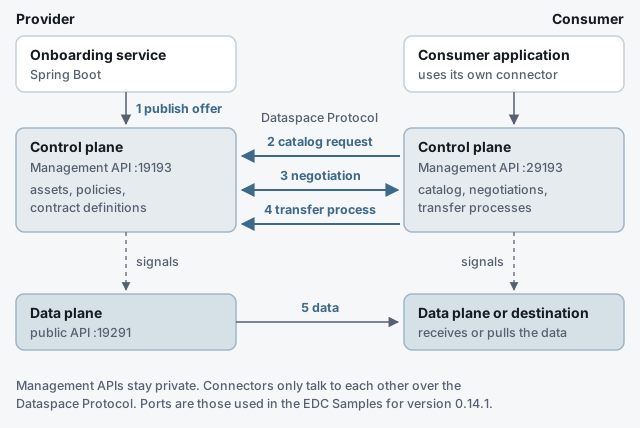
Running a provider connector locally
The EDC Samples build a minimal connector you can run as a provider. From a checkout of the Samples at that version:
./gradlew transfer:transfer-00-prerequisites:connector:build

java -Dedc.fs.config=transfer/transfer-00-prerequisites/resources/configuration/provider-configuration.properties \
     -jar transfer/transfer-00-prerequisites/connector/build/libs/connector.jar
The sample configuration uses these ports:
| API | Provider | Consumer |
|---|---|---|
| Management | 19193/management | 29193/management |
| Protocol (DSP) | 19194/protocol | 29194/protocol |
| Public data plane | 19291/public | 29291/public |
If a README and the configuration disagree, trust the .properties files.
Publishing an offer: three resources
A provider makes data available by creating three things through its Management API, in this order.
1. The asset
An asset describes a piece of data and where it really lives. Its properties are public: they appear in the catalog other participants see. The dataAddress tells the data plane how to fetch the data, and is never shared.
{
  "@context": { "@vocab": "https://w3id.org/edc/v0.0.1/ns/" },
  "@id": "asset-1",
  "properties": {
    "name": "Supplier master data",
    "contenttype": "application/json"
  },
  "dataAddress": {
    "type": "HttpData",
    "baseUrl": "https://internal.example.com/api/suppliers",
    "proxyPath": "true"
  }
}
The @vocab entry maps unprefixed keys to EDC’s namespace, which keeps the JSON-LD readable. Anything internal, such as a list of partners allowed to see the asset, belongs in privateProperties, not properties, and credentials belong in a vault, never in the data address.
2. The policy definition
Policies are ODRL. This one permits use only to participants that satisfy a location constraint:
{
  "@context": {
    "@vocab": "https://w3id.org/edc/v0.0.1/ns/",
    "odrl": "http://www.w3.org/ns/odrl/2/"
  },
  "@id": "eu-only",
  "policy": {
    "@context": "http://www.w3.org/ns/odrl.jsonld",
    "@type": "Set",
    "permission": [{
      "action": "use",
      "constraint": {
        "@type": "AtomicConstraint",
        "leftOperand": "location",
        "operator": { "@id": "odrl:eq" },
        "rightOperand": "eu"
      }
    }],
    "prohibition": [],
    "obligation": []
  }
}3. The contract definition
A contract definition puts assets and policies together into an offer. The access policy decides who can see the offer in the catalog; the contract policy is what a negotiated agreement is based on:
{
  "@context": { "@vocab": "https://w3id.org/edc/v0.0.1/ns/" },
  "@id": "contract-asset-1",
  "accessPolicyId": "eu-only",
  "contractPolicyId": "eu-only",
  "assetsSelector": [{
    "@type": "CriterionDto",
    "operandLeft": "https://w3id.org/edc/v0.0.1/ns/id",
    "operator": "=",
    "operandRight": "asset-1"
  }]
}
An empty assetsSelector selects every asset. To select one, compare the full, expanded id key as above. Older tutorials use asset:prop:id, which may match nothing on a JSON-LD connector, so the asset never shows up in anyone’s catalog.
Calling the Management API from Spring Boot
The onboarding service hides all of this behind one endpoint: a provider registers a data source, and the service creates the asset, policy and contract definition. Start with a RestClient pointed at the connector:
edc:
  provider:
management-url: ${EDC_PROVIDER_MGMT_URL:http://localhost:19193/management/v3}@Bean
RestClient edcManagementClient(RestClient.Builder builder,
@Value("${edc.provider.management-url}") String baseUrl) {
return builder.baseUrl(baseUrl).build();
}The JSON-LD bodies are easiest to build as maps. Keeping every Management API call in one class means an API upgrade touches one file:
@Service
class OfferPublisher {

    private static final String EDC = "https://w3id.org/edc/v0.0.1/ns/";
    private static final String ODRL = "http://www.w3.org/ns/odrl/2/";

    private final RestClient edc;

    OfferPublisher(RestClient edcManagementClient) {
        this.edc = edcManagementClient;
    }

    String publish(String name, String sourceUrl, String region) {
        String assetId = "asset-" + UUID.randomUUID();
        String policyId = "policy-" + assetId;

        post("/assets", Map.of(
                "@context", Map.of("@vocab", EDC),
                "@id", assetId,
                "properties", Map.of("name", name, "contenttype", "application/json"),
                "dataAddress", Map.of("type", "HttpData", "baseUrl", sourceUrl, "proxyPath", "true")));

        post("/policydefinitions", Map.of(
                "@context", Map.of("@vocab", EDC, "odrl", ODRL),
                "@id", policyId,
                "policy", Map.of(
                        "@context", "http://www.w3.org/ns/odrl.jsonld",
                        "@type", "Set",
                        "permission", List.of(Map.of(
                                "action", "use",
                                "constraint", Map.of(
                                        "@type", "AtomicConstraint",
                                        "leftOperand", "location",
                                        "operator", Map.of("@id", "odrl:eq"),
                                        "rightOperand", region))))));

        post("/contractdefinitions", Map.of(
                "@context", Map.of("@vocab", EDC),
                "@id", "contract-" + assetId,
                "accessPolicyId", policyId,
                "contractPolicyId", policyId,
                "assetsSelector", List.of(Map.of(
                        "@type", "CriterionDto",
                        "operandLeft", EDC + "id",
                        "operator", "=",
                        "operandRight", assetId))));

        return assetId;
    }

    private String post(String path, Map<String, Object> body) {
        return edc.post()
                .uri(path)
                .contentType(MediaType.APPLICATION_JSON)
                .body(body)
                .retrieve()
                .body(IdResponse.class)
                .id();
    }

    record IdResponse(@JsonProperty("@id") String id, long createdAt) {}
}
The order matters: the contract definition refers to the policy by id, so the policy has to exist first. When the connector rejects a request, RestClient throws an HttpClientErrorException carrying EDC’s status and body. Translate it into your own API’s error format, as described in Spring Boot REST Errors with ProblemDetail and Validation.
Securing the Management API
The samples run the Management API without authentication. Anywhere else, turn on the token-based check in the connector configuration:
web.http.management.auth.type=tokenbased
web.http.management.auth.key=change-me
Then send the key from Spring Boot with builder.defaultHeader("X-Api-Key", apiKey), and keep the Management API on a private network all the same.
The consumer side
The consumer drives its own connector’s Management API, and that connector does the DSP work with the provider:
- Catalog.
POST /management/v3/catalog/requestwith the provider’s DSP address (http://localhost:19194/protocol) returns a DCAT catalog. Each dataset carries an offer underodrl:hasPolicy, whose@idis needed next. - Negotiation.
POST /management/v3/contractnegotiationswith that offer starts a negotiation. PollGET /management/v3/contractnegotiations/{id}until the state isFINALIZED(orTERMINATED), and read thecontractAgreementId. - Transfer.
POST /management/v3/transferprocesseswith the agreement id. A push transfer (HttpData-PUSH) sends the data to a destination and endsCOMPLETED. A pull transfer (HttpData-PULL) staysSTARTED, and the consumer fetches an endpoint data reference from/management/v3/edrs/{id}/dataaddressto call the provider’s public data plane.
{
  "@context": { "@vocab": "https://w3id.org/edc/v0.0.1/ns/" },
  "@type": "ContractRequest",
  "counterPartyAddress": "http://localhost:19194/protocol",
  "protocol": "dataspace-protocol-http",
  "policy": {
    "@context": "http://www.w3.org/ns/odrl.jsonld",
    "@id": "<offer id from the catalog>",
    "@type": "Offer",
    "assigner": "provider",
    "target": "asset-1"
  }
}
What changed in EDC 1.0
The concepts above carry over unchanged. The wire format did not:
- Management API v4. v3 was deprecated in EDC 0.17 and removed in 1.0. v4 keeps the same resources under
/management/v4, but every body needs an explicit@type(Asset,PolicyDefinition,ContractDefinition,Criterion,TransferRequest,CatalogRequest) and uses a new JSON-LD context. See the EDC team’s notes on the Management API versions. - Dataspace Protocol 2025-1. The current DSP version is 2025-1. Requests name it as
dataspace-protocol-http:2025-1, address…/protocol/2025-1and include acounterPartyId. The original 0.8 protocol used above was dropped in EDC 0.16. - Data planes. The old data-plane framework was replaced by Data Plane Signaling, and the transfer samples were removed from the Samples repository in October 2026. The pinned December 2025 version still works for learning the flow.
For the Spring Boot side, the upgrade means a new base URL and new JSON bodies, which is one more reason to keep every Management API call in a single class.
Checklist
- Asset, then policy, then contract definition, in that order.
- Public data in
properties; internal data inprivateProperties; secrets in a vault. - The ODRL context inside every policy, and a read-back to confirm the rules.
- Asset selectors on the expanded
…/ns/idkey. - All Management API calls in one client class, behind a token, on a private network.
- Version numbers written down: v3 and DSP 0.8 here, v4 and DSP 2025-1 on EDC 1.0.