Virtual Threads in Spring Boot: When They Actually Help
By Uddip Acharjee Shuvo9 min read
Java 21 made virtual threads a standard feature, and Spring Boot 3.2 turned them into a one-line switch. That makes it tempting to flip the switch and expect everything to get faster. It won’t. Virtual threads help one specific shape of workload a lot, do nothing for others, and come with two traps that can make things worse.
This guide covers what changes when you enable them in Spring Boot, where they pay off, where they don’t, and how to tell which case you are in.
What a virtual thread is
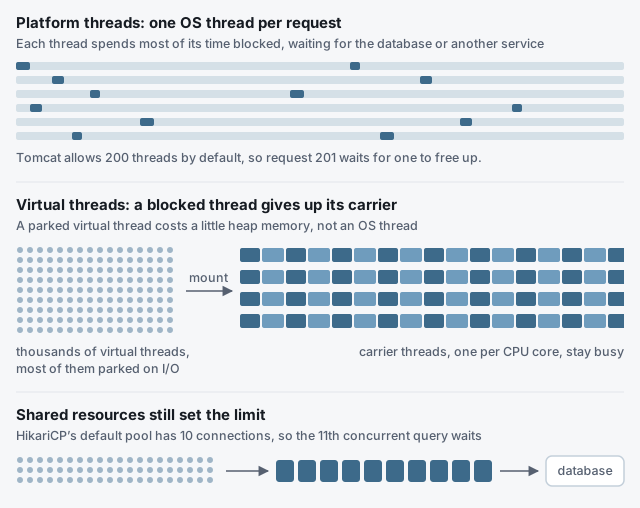
A normal Java thread, a platform thread, is a thin wrapper around an operating-system thread. OS threads are expensive: each reserves a stack, and a server can only run a few thousand. So Tomcat keeps a pool (200 by default) and each request holds one thread for its whole life, including all the time it spends waiting for the database.
A virtual thread is managed by the JVM instead. When it blocks on I/O, such as a JDBC query, an HTTP call or a socket read, the JVM unmounts it and parks it on the heap. The platform thread underneath, called a carrier, is free to run another virtual thread straight away. There are only as many carriers as CPU cores, but you can have hundreds of thousands of virtual threads.
Turning them on in Spring Boot
On Java 21 or later with Spring Boot 3.2 or later:
spring.threads.virtual.enabled=trueThat one property changes several things at once:
- Tomcat and Jetty handle each request on a new virtual thread.
- The
applicationTaskExecutorbehind@Asyncand async Spring MVC requests becomes aSimpleAsyncTaskExecutorthat starts a virtual thread per task. @Scheduledtasks and several messaging listener containers run on virtual threads too.
Virtual threads are daemon threads, so an application with no web server that only runs scheduled tasks can exit right after startup. Add spring.main.keep-alive=true for that case. To check the switch worked, log the current thread in a controller. It prints something like VirtualThread[#52]/runnable@ForkJoinPool-1-worker-3.
When they help
Virtual threads raise throughput for code that spends most of its time waiting. They do not make any single request faster. The workloads that benefit are:
- Request handlers dominated by blocking I/O: JDBC, calls to other services with
RestClient, file access. - High concurrency, where requests queue for Tomcat’s 200 threads while those threads sit idle waiting on I/O.
- Fan-out inside a request. Starting a virtual thread per call is cheap, so parallel calls no longer need a carefully sized pool:
public Dashboard load(String customerId) throws Exception {
    try (var executor = Executors.newVirtualThreadPerTaskExecutor()) {
        Future<Customer> customer = executor.submit(() -> customerClient.get(customerId));
        Future<List<Order>> orders = executor.submit(() -> orderClient.forCustomer(customerId));
        return new Dashboard(customer.get(), orders.get());
    } // close() waits for both tasks
}
This is the main appeal: the scalability people used to adopt reactive programming for, while keeping plain blocking code that is easy to read, debug and profile.
When they don’t help
CPU-bound work
There is still one carrier per core. Code that is busy computing, whether JSON mapping of huge payloads, image processing or hashing, gets no extra throughput from more threads.
When a shared resource is the real limit
With platform threads, Tomcat’s pool quietly capped how many requests could hit the database at once. Remove that cap and thousands of virtual threads arrive at the connection pool together. HikariCP’s default is 10 connections, so request number 11 waits for a connection, and after 30 seconds (the default connectionTimeout) it fails. The bottleneck has moved, not disappeared.
The same applies to rate-limited APIs. Since threads no longer ration concurrency, ration it explicitly where it matters, with a Semaphore rather than a smaller thread pool:
private final Semaphore permits = new Semaphore(20); // the downstream API allows 20 concurrent calls

public Stock stock(String sku) throws InterruptedException {
    permits.acquire();
    try {
        return inventoryClient.stock(sku);
    } finally {
        permits.release();
    }
}
Pooling virtual threads
Thread pools exist to ration expensive threads. Virtual threads are cheap, so create one per task and let it end. A fixed pool of virtual threads just reintroduces the limit you were trying to remove.
Pinning: the trap on Java 21
On Java 21, a virtual thread that blocks while inside a synchronized block or method cannot unmount. It stays pinned to its carrier and holds a whole CPU core while it waits. With only a handful of carriers, a few pinned threads can stall the entire application.
On Java 21, replace synchronized around blocking calls with a ReentrantLock, which virtual threads can wait on without pinning:
private final ReentrantLock lock = new ReentrantLock();
private volatile Token token;

Token current() {
    lock.lock();
    try {
        if (token == null || token.isExpired()) {
            token = authClient.fetchToken();   // blocking HTTP call
        }
        return token;
    } finally {
        lock.unlock();
    }
}
To find pinning, run with -Djdk.tracePinnedThreads=full on Java 21, which prints a stack trace whenever a pinned thread blocks, or record the jdk.VirtualThreadPinned JDK Flight Recorder event. Library code can pin too, so keep JDBC drivers and HTTP clients up to date: many have replaced synchronized with locks for exactly this reason.
ThreadLocal habits to drop
Every virtual thread has its own ThreadLocal values, just like a platform thread. Code that caches something expensive in a ThreadLocal, assuming a pool of 200 long-lived threads, will now create one per request. Cache it in a shared, thread-safe object instead.
Measure before you decide
Whether virtual threads help is a property of your workload, so test it on yours. Run the same load test against the same endpoints with the property on and off, and compare throughput, p99 latency and error rate. While it runs, watch the connection pool through Actuator’s metrics:
management.endpoints.web.exposure.include=health,metricshikaricp.connections.pending shows threads waiting for a connection, and hikaricp.connections.active shows how many are in use. If pending climbs as soon as you enable virtual threads, the database pool is your real limit, and that is where the next improvement has to come from.
Checklist
- Java 21+ and Spring Boot 3.2+, then
spring.threads.virtual.enabled=true. - Use them for I/O-bound, high-concurrency workloads, not CPU-bound ones.
- Bound shared resources explicitly: pool sizes, and semaphores for downstream APIs.
- Never pool virtual threads.
- On Java 21, no blocking inside
synchronized; better still, run on Java 25. - Load test with the property on and off, and watch the pool metrics.