Best Git GUI Clients in 2026: Price, Platforms and Licences
By Uddip Acharjee Shuvo14 min read
Most developers use Git from the command line for the quick things, then reach for a graphical client when history gets complicated: untangling a branch, staging half a file, or resolving a conflict with both sides in view. There are plenty of clients to choose from, and they differ more in price, platform and licensing than in what they can do.
This guide compares nine actively maintained desktop Git clients, plus the Git tools already built into IntelliJ IDEA and VS Code. Prices, platforms and features come from each vendor’s own site and documentation, checked in October 2026.
What to look for in a Git client
- Platforms. Linux support narrows the field quickly, and a team on mixed operating systems benefits from one tool everywhere.
- Licence terms. “Free” can mean free for public repositories only, or free for non-commercial use only. Check before using a client at work.
- Accounts. Some clients need a vendor account just to start; others need nothing at all.
- Conflict resolution. A built-in merge editor saves switching tools at the most stressful moment.
- Partial staging. Staging individual hunks or lines is what makes small, focused commits practical.
- History editing. Interactive rebase, cherry-pick, and in some clients an undo button.
- Integrations and big repositories. Pull requests and issue trackers, plus Git LFS, submodules and worktrees if your projects use them.
Quick comparison
| Client | Platforms | Price | Best for |
|---|---|---|---|
| GitHub Desktop | macOS, Windows | Free | beginners and teams that live on GitHub |
| LithiumGit | macOS, Windows, Linux | Free | a free, graph-centred client on Windows, macOS or Linux |
| Fork | macOS, Windows | $59.99 once | a one-time purchase on macOS or Windows |
| GitKraken Desktop | macOS, Windows, Linux | Free tier; from $120/user/yr | teams that want integrations and a polished graph on any OS |
| SmartGit | macOS, Windows, Linux | Free non-commercial; from $5/user/mo | a mature cross-platform client, free for non-commercial use |
| Sourcetree | macOS, Windows | Free | a free, full-featured client for Bitbucket teams |
| Sublime Merge | macOS, Windows, Linux | $99 once (personal) | keyboard-driven developers and Sublime Text users |
| TortoiseGit | Windows | Free | Windows users who want Git inside File Explorer |
| Tower | macOS, Windows | From $69/user/yr | professionals who want undo and polish on macOS or Windows |
Which one should you choose?
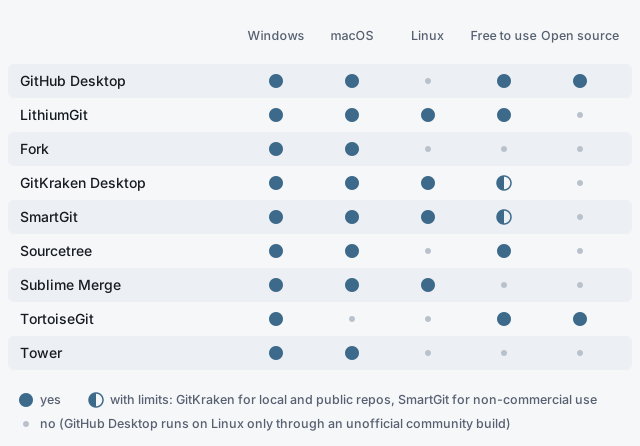
- Free and open source: GitHub Desktop on macOS and Windows, or TortoiseGit on Windows.
- Free on Linux: LithiumGit, for any use. SmartGit is free for non-commercial use, and GitKraken Desktop for local and public repositories.
- No subscription: Fork ($59.99 once) or Sublime Merge ($99 once for personal use).
- Learning Git on GitHub: GitHub Desktop.
- A Bitbucket and Jira team: Sourcetree.
- Git inside Windows File Explorer: TortoiseGit.
- Undo for Git operations: Tower.
- Team integrations and AI features: GitKraken Desktop.
- Keyboard-first, with fast search and diffs: Sublime Merge.
- Already in IntelliJ IDEA or VS Code all day: try the built-in tools first (see below).
The clients
GitHub Desktop
Best for beginners and teams that live on GitHub
- Price
- Free
- Platforms
- macOS, Windows
- License
- Open source (MIT)
- First released
- 2017 (the current app)
- Website
- github.com
GitHub’s own client, built to make the everyday loop of commit, push, pull and pull request as simple as possible. It replaced the older GitHub for Mac and GitHub for Windows apps.
Key features
- Stage individual lines
- Check out pull requests and add co-authors to commits
- Drag-and-drop cherry-pick, squash and reorder
- Copilot-generated commit messages, including on Copilot Free
- Worktree support
Strengths
- Free and open source
- The gentlest learning curve of any client here
- Signing in is optional
Limitations
- No official Linux build; a community fork exists but lags behind
- No built-in merge editor: conflicts open in your text editor
- Pull request and Copilot features only work with GitHub
LithiumGit
Best for a free, graph-centred client on Windows, macOS or Linux
- Price
- Free, including business use
- Platforms
- macOS, Windows, Linux
- License
- Proprietary freeware (closed source)
- First released
- In development since 2021
- Website
- lithiumgit.com
A free client built around an interactive commit graph, where you merge, rebase, cherry-pick and branch by acting on the graph itself. It uses the Git you already have installed and works with any remote host.
Key features
- Interactive graph: merge, rebase, cherry-pick, checkout and create branches from it
- Built-in file editing: change files right in the app, without switching to an editor
- Hunk-by-hunk staging with an editable side-by-side diff
- Advanced conflict resolution editor: current and incoming changes side by side, accept either or both per conflict, and track how many are resolved
- Stash management: save, apply, pop and delete
- Patch import and export for sharing uncommitted changes
Strengths
- Free for commercial use, with no account or sign-in
- Official builds for all three desktop platforms
- Works with GitHub, GitLab, Bitbucket, Gerrit or any other remote
Limitations
- Closed source, and pull requests are not accepted
- Git must be installed separately
- No documented interactive rebase, Git LFS, submodules or hosting integrations
Fork
Best for a one-time purchase on macOS or Windows
- Price
- $59.99 one-time, for personal and commercial use (free evaluation)
- Platforms
- macOS, Windows
- License
- Proprietary
- First released
- 2016 (macOS), 2018 (Windows)
- Website
- git-fork.com
A desktop client sold as a single purchase rather than a subscription, with frequent releases on both platforms. Its visual interactive rebase and conflict helper make history editing approachable without hiding what Git is doing.
Key features
- Visual interactive rebase
- Merge-conflict helper with a built-in resolver
- Image diffs, blame and file history
- Git LFS, submodules, Git-flow and worktrees
- AI-assisted commit messages
Strengths
- One payment covers one user on up to three machines
- No account needed
- Actively developed, with frequent releases on both platforms
Limitations
- No Linux version
- Paid once the evaluation ends
GitKraken Desktop
Best for teams that want integrations and a polished graph on any OS
- Price
- Free for local and public repositories; paid plans from $120 per user per year (list price)
- Platforms
- macOS, Windows, Linux
- License
- Proprietary
- First released
- 2016
- Website
- gitkraken.com
The most feature-rich client in this list, built around a colourful commit graph and a growing set of team and AI features. The free Community plan covers local and public repositories; private remotes need a subscription.
Key features
- Commit graph at the centre of the interface
- Interactive rebase, Git LFS, submodules and worktrees
- Built-in merge tool and conflict detection across a team
- GitHub, GitLab, Bitbucket and Azure DevOps integrations (Jira and Trello on paid plans)
- GitKraken AI for commit messages, pull request descriptions and conflict resolution
Strengths
- Runs on Linux, with .deb, .rpm and Snap packages
- Integrations reach issue trackers as well as hosting
- One subscription also covers GitLens Pro in VS Code
Limitations
- Private repositories need a paid plan
- Subscription only
- Self-hosted GitHub and GitLab integrations need the higher tiers
SmartGit
Best for a mature cross-platform client, free for non-commercial use
- Price
- Free for non-commercial use; commercial from $5 per user per month
- Platforms
- macOS, Windows, Linux
- License
- Proprietary
- First released
- 2009
- Website
- smartgit.dev
One of the longest-running Git clients, with a dense, capable interface and first-class Linux support. A free Hobby licence unlocks almost everything for personal, non-commercial work.
Key features
- Commit graph and a dedicated Conflict Solver
- Git-Flow, GitHub Flow and Feature Flow support
- Git LFS and worktrees
- GitHub, GitLab, Bitbucket, Azure DevOps and Jira integrations
- AI commit messages and custom AI prompts
Strengths
- Linux packages as tar, Flatpak and .deb
- Free for open source, education and charities as well
- 30-day anonymous evaluation
Limitations
- The free licence needs registration with your real name and is reviewed by hand
- Self-hosted integrations are commercial-only
- Subscription licences need internet access to renew the licence file
Sourcetree
Best for a free, full-featured client for Bitbucket teams
- Price
- Free
- Platforms
- macOS, Windows
- License
- Proprietary
- First released
- macOS by 2011, Windows in 2013
- Website
- sourcetreeapp.com
Atlassian’s free client, with a long feature list for a price of zero. It suits teams already using Bitbucket and Jira, and still supports Mercurial alongside Git.
Key features
- Stage or discard by file, hunk or line
- Interactive rebase
- Git LFS, Git-flow and submodules
- Search across commits, file changes and branches
- Bitbucket integration, plus Mercurial support
Strengths
- Free, with no paid tiers or feature limits
- Git-flow built in
Limitations
- Requires an Atlassian account
- No Linux version
Sublime Merge
Best for keyboard-driven developers and Sublime Text users
- Price
- $99 one-time for personal use (3 years of updates); $75 per user per year for business
- Platforms
- macOS, Windows, Linux
- License
- Proprietary
- First released
- 2018
- Website
- sublimemerge.com
From the makers of Sublime Text, with the same command palette and keyboard-first design. Its diffs and search are the main draw: syntax-highlighted, character-level, and quick to navigate.
Key features
- Stage files, hunks or individual lines
- Built-in merge tool
- Side-by-side, syntax-highlighted diffs with character-level changes
- Instant search across commit messages, authors, paths and contents
- Command palette and custom Git commands
Strengths
- One personal licence covers all your machines and operating systems
- Official Linux packages and repositories
- Keyboard-driven, in the style of Sublime Text
Limitations
- A licence is required for continued use after evaluating
- No pull request or hosting integrations
TortoiseGit
Best for Windows users who want Git inside File Explorer
- Price
- Free, including commercial use
- Platforms
- Windows
- License
- Open source (GPL v2)
- First released
- 2008
- Website
- tortoisegit.org
Not a separate app but a Windows Explorer extension: right-click a folder for Git commands, and see each file’s status in its icon. It will feel familiar to anyone who used TortoiseSVN.
Key features
- Explorer context menu and status overlay icons
- TortoiseGitMerge, TortoiseGitBlame and image diff tools
- Rebase, reflog, bisect and stash dialogs
- Submodules, worktrees and Git LFS locking
- Issue tracker integration and a spell-checking commit dialog
Strengths
- Free and open source, for any use
- Works wherever you browse files, with no extra window
- Very mature, with active releases
Limitations
- Windows only
- Needs Git for Windows installed separately
- No single window with the whole repository’s history and graph
Tower
Best for professionals who want undo and polish on macOS or Windows
- Price
- $69 to $149 per user per year (30-day free trial)
- Platforms
- macOS, Windows
- License
- Proprietary
- First released
- 2011 (macOS), 2016 (Windows)
- Website
- git-tower.com
A polished commercial client whose signature feature is undo: press Cmd/Ctrl+Z after many Git operations and they are reversed. Strong documentation and support make it popular with companies.
Key features
- Undo for many Git actions
- Drag-and-drop interactive rebase, merge and cherry-pick
- Conflict Wizard for guided conflict resolution
- Stacked branches (Pro plan)
- Worktrees, Git LFS, submodules and Git-flow
Strengths
- Undo makes experimenting with history much less risky
- One licence covers both macOS and Windows
- Free for students, teachers and non-profits
Limitations
- No Linux version
- Subscription only, with no free tier after the trial
- Some features need the Pro plan
You may already have one: Git in your IDE
IntelliJ IDEA
Since IntelliJ IDEA 2025.3, the Community and Ultimate editions ship as a single download. Without a subscription it is free for commercial and non-commercial projects, and the Git tooling is part of that free tier:
- A Log tab with the commit graph, branch filters and search.
- Interactive rebase: reword, squash, drop or edit earlier commits.
- A three-pane conflict resolver that applies non-conflicting changes for you.
- Shelve and stash, changelists, and committing part of a file.
- Reviewing GitHub pull requests and GitLab merge requests.
For Java developers this is the strongest argument against a separate client: history, conflicts and code navigation all in one window.
VS Code and GitLens
VS Code’s built-in Source Control view has a commit graph, staging of selected lines, branches, stashes and worktrees, and a three-way merge editor. The GitLens extension adds inline blame, file history and an interactive rebase editor for free. Its Commit Graph, Worktrees and Visual History views are free on public repositories; private ones need GitLens Pro, which is the same subscription as GitKraken Pro (listed at $120 per user per year as of October 2026).
Frequently asked questions
What is the best free Git GUI client?
It depends on your platform and how much openness matters. GitHub Desktop is free and open source on macOS and Windows. TortoiseGit is free and open source on Windows. Sourcetree is free on macOS and Windows but needs an Atlassian account. LithiumGit is free on macOS, Windows and Linux, including for business use, but closed source. GitKraken Desktop and SmartGit have free tiers with limits.
Which Git GUI clients work on Linux?
GitKraken Desktop, LithiumGit, SmartGit and Sublime Merge have official Linux builds. GitHub Desktop runs on Linux only through an unofficial community build, and Fork, Sourcetree, Tower and TortoiseGit have no Linux version.
Which Git GUI clients are open source?
Of the nine compared here, GitHub Desktop (MIT) and TortoiseGit (GPL v2). The others are proprietary, including the free ones. In VS Code, the core of the GitLens extension is also MIT-licensed.
Is there a good Git GUI without a subscription?
Yes. Fork costs $59.99 once, and Sublime Merge's personal licence is $99 once with three years of updates. GitHub Desktop, Sourcetree, TortoiseGit and LithiumGit are free.
Is GitKraken free?
GitKraken Desktop's free Community plan covers local repositories and public remotes. Private repositories and several integrations need a paid plan, listed from $120 per user per year as of October 2026.
Do I need a separate Git client if I use IntelliJ IDEA or VS Code?
Often not. Since version 2025.3, IntelliJ IDEA ships as a single distribution whose free tier includes its Git tooling: a commit graph, interactive rebase, a three-pane conflict resolver and partial commits. VS Code has a source control graph, line-level staging and a three-way merge editor built in. A separate client is most useful when you want one tool across editors or a more visual history.
Can a Git GUI replace the command line?
For most daily work, yes. Most developers still use both: a GUI for reviewing changes, staging parts of files and resolving conflicts, and the command line for scripting and the occasional operation their client does not support.
How this comparison was put together
Prices, platforms, licences, release years and features come from each vendor’s website, documentation, release notes and repositories, checked in October 2026. Prices are list prices in US dollars, before promotions and taxes, and change often, so check the vendor’s site before you buy. If something here is out of date, tell me on GitHub.